Technology Advisor Blog


Thinking About Switching IT Providers? Here's What the First 30 Days Look Like

Posted by Ann Westerheim on 7/13/26 2:55 PM

"We know we need better IT support...we're just not sure we want to go through the hassle of changing."

If that thought has crossed your mind, you're not alone.


Many businesses stay with an IT provider long after they've become dissatisfied. Support requests take too long. Communication isn't what it should be. Cybersecurity doesn't feel as proactive as it once did. Yet making a change can seem like a project you'd rather put off.

The hesitation usually isn't about whether a better IT partner exists. It's about wondering what happens next. Will there be downtime? Will employees have trouble logging in? Will anything get missed? How much of your own time will the transition require?

These are reasonable questions.

The good news is that changing IT providers doesn't have to be disruptive. Like any important business project, success comes from having a well-defined process and a team that's done it many times before.

At Ekaru, we've refined our onboarding process over years of helping organizations transition from another IT provider - or, in some cases, from having little or no formal IT support at all. Our goal is simple: make the transition as smooth as possible so you can keep your focus on running your business.

Here's what that process typically looks like.

Step 1: We Start by Understanding Your Business

Before we make any technical changes, we take the time to learn about your organization.  What are the specific tech needs in your industry? What compliance standards will be you accountable for?  Who are the key players in the organization?  What are your most important systems?  What is your daily workflow like?

We meet with your primary point of contact to review your goals, discuss your current environment, explain how the onboarding process works, and make sure everyone knows what to expect. We also review your service agreement and the tools we'll be implementing to support and protect your business.

This first meeting sets the foundation for everything that follows. Clear expectations and open communication help ensure there are no surprises along the way. We'll take the time to explain every step in plain English.

Step 2: We Coordinate with Your Current IT Provider

One concern we often hear is, "Do I have to manage the handoff between the two IT companies?"

In most cases, no.

We work directly with your current provider to coordinate the transition, gather important information, and establish a timeline. Our goal is to make the process as seamless as possible for you.

Occasionally, an outgoing provider isn't as responsive as we'd hope. While that's never ideal, it's something we've encountered before. We have established procedures for moving forward while keeping your business on track.

Many business owners also wonder what it's like to tell their current IT provider they're making a change. That's a perfectly normal concern. While no company likes to lose a client, we've found that most transitions are handled professionally. If the current relationship isn't working, its usually apparent to both sides.  We coordinate directly with the outgoing provider whenever possible and keep the focus where it belongs - on making sure your business continues to operate smoothly throughout the transition. In our experience, the transition will be professional.  

We approach every onboarding with empathy. We understand that no one enjoys losing a client, and our goal isn't to criticize the work that came before us. Instead, we focus on making the handoff as seamless as possible, communicating clearly, gathering the information we need, and treating your former provider as a professional partner in the transition whenever possible.

That respectful approach benefits everyone - especially you. It helps us obtain documentation, transfer systems efficiently, and minimize disruption so your business can keep running while we get to know your environment.

Step 3: We Carefully Plan the Technology Transition

One of the most important parts of onboarding happens behind the scenes.

Your security tools, monitoring software, and other management systems all need to be transitioned carefully. Installing new tools too early can create conflicts. Waiting too long can leave unnecessary gaps in protection.

Timing matters.

That's why we carefully coordinate when existing tools are removed and when Ekaru's solutions are installed, helping ensure your business remains protected throughout the transition.  Our team monitors on a daily basis to help ensure there are never any gaps.

Step 4: We Meet Your Team Where They Work

Every business is different.

For some organizations, we'll schedule onsite visits to install software, answer questions, and make sure everything is working properly.

For organizations with remote employees, we schedule individual remote sessions so each person receives the same attention and support.  With many remote workers we set up a calendar and invite employees to select times that work the best.  Typically, we just need a short session to install some tools.  Of course, we're also available to answer any questions along the way.

Sometimes onboarding is completed in a single visit. Other times, multiple visits make the most sense. We tailor the schedule to your business - not the other way around.

Step 5: We Build the Foundation for Great IT Support

Installing software is only part of onboarding.

Behind the scenes, we configure system monitoring, establish secure administrative access, review security settings, enroll employees in cybersecurity awareness training, and make sure your environment is properly documented.

That documentation is especially important.

When you contact our Help Desk in the future, our technicians already understand your systems. Instead of spending valuable time figuring out how your network is configured, they can get to work solving your issue more quickly.

A well-documented environment helps us deliver better support from day one.  We also have internal daily huddles and weekly meetings to make sure everyone on our team is aware of your business, and has secure access to the tools to support you.

Step 6: We Make Sure Nothing Gets Missed

Our onboarding isn't finished simply because the tools have been installed.

We review everything against the original plan, confirm that all contracted services have been completed, finalize our documentation, and schedule a follow-up meeting with you.

That gives us an opportunity to answer questions, review the onboarding experience together, and make sure you're comfortable with everything moving forward.  At that time, we'll review preliminary reporting to you to show your current tech status.  If we missed a computer in a corner somewhere, or at a remote employees house, this inventory is crucial to make sure we have all bases covered.  

A Good Process Builds Confidence

Most business owners have never changed IT providers before. It's understandable that they don't know what to expect.

What we've found is that once clients understand the process, the transition feels much more manageable. There isn't one big "switch-over day" where everything changes at once. Instead, it's a series of carefully planned steps, clear communication, and ongoing coordination designed to minimize disruption while making sure nothing important gets overlooked.

Changing IT providers is an important decision, but it doesn't have to be a stressful one. With an experienced team and a proven process, the transition can be far smoother than most businesses expect.  We help lay the groundwork for open communications.  It there's ever something you're not happy with, or don't fully understand, we just ask that you speak up and our team will help.

If you've been considering a change but weren't sure what the process would involve, we'd be happy to walk you through what onboarding would look like for your organization. Even if you're not ready to make a move today, understanding the process can help you make a more informed decision when the time is right.

Interested in continuing the conversation?


About the author:

Ann Westerheim, PhDis the Founder and President of Ekaru, a Technology Service Provider of cybersecurity and IT services for small and medium businesses in the greater Boston area. Ann is an accomplishedtechnology innovator and leader with three engineering degrees from MIT. She has twenty years of high tech experience in research, advanced development, product development, and as an entrepreneur. Her career has spanned a vast range of technology endeavors including research in thin film semiconductors and superconductors, microprocessor fabrication, development of early Internet medical applications, and now focusing on the application of technology in business. She has an avid focus on the "last mile" of technology and decreasing the digital divide.

Read More

Tags: tech support, IT support, onboarding


What If the Cyberattack Starts With a Conversation?

Posted by Ann Westerheim on 6/24/26 4:54 PM

 Modern cybersecurity threats don't always begin with malware or a suspicious link. Sometimes they start with a conversation that seems completely legitimate. Here's what one recent social engineering assessment can teach small businesses about protecting themselves. 

When most people think about phishing attacks, they picture an email filled with spelling mistakes, suspicious links, and obvious red flags. 

Unfortunately, that's not how many modern attacks work.  "Don't click on a suspicious link" doesn't cut it anymore for security awareness training.

A recent social engineering assessment conducted by security researchers at NetSPI demonstrated just how sophisticated today's attackers have become. Instead of sending a traditional phishing email, the researchers spent time building trust before ever introducing a malicious link.

The scenario they created was simple - and highly believable. Too many people think they'll never fall for a

Read More

Tags: eMail, cybersecurity, Cybersecurity Awareness Training


Is Your Business Vacation Ready? What Small Business Owners in Greater Boston Need to Know

Posted by Linda Hanson on 6/17/26 9:25 AM

Summer is here and most small business owners are thinking about time off.

Read More

Tags: Customer service, cybersecurity, Security Awareness, IT services Boston, Tech Tips, vacation


Windows June 2026 Patch Tuesday: What Small Businesses Need to Know

Posted by Linda Hanson on 6/12/26 8:52 AM

Microsoft released its June 2026 Patch Tuesday security update yesterday and this one is historically large.

June 2026 marks the largest single Patch Tuesday release in the program's history, addressing 200 security vulnerabilities across Windows, Office, Azure, Exchange, Hyper-V, and related products. For small businesses in Massachusetts that rely on Windows devices, there are several things worth understanding before the end of the week.

At Ekaru, we provide managed IT services for small businesses across greater Boston. Staying ahead of security patches is one of the most important things a small business IT support provider can do for its clients. Here is what matters most this month.

Read More

Tags: Security, Patches, Microsoft Windows Update, Microsoft, Desktop, Managed Services, Microsoft Security Patches, IT services Boston, Computer Restart, Microsoft Windows 11 Update


Cybersecurity in 2026: What Small Businesses Need to Learn from 22,000 Data Breaches

Posted by Ann Westerheim on 6/3/26 3:43 PM

Every year, Verizon publishes its Data Breach Investigations Report (DBIR), one of the most respected cybersecurity reports in the industry. The 2026 report analyzed more than 22,000 confirmed data breaches across 145 countries, making it one of the largest collections of real-world cybersecurity data available.

At Ekaru, we pay close attention to reports like this because they help us separate trends from headlines. Instead of relying on assumptions, we can see exactly how attackers are succeeding, where businesses are struggling, and what organizations can do to better protect themselves.

Before we dive into the findings, it's helpful to understand two terms you'll see throughout cybersecurity reports:

Incident: A security event that disrupts business operations, compromises systems, or creates a security risk.

Breach: A type of incident where sensitive information is actually accessed, stolen, or exposed to someone who shouldn't have it.

In other words, every breach is an incident, but not every incident becomes a breach. For example, a ransomware attack or website outage may be considered a security incident even if no customer or company data is stolen.

The biggest takeaway from this year's report is surprisingly simple:

Cybersecurity fundamentals matter more than ever.

While artificial intelligence, ransomware, and sophisticated cybercriminal groups continue to dominate the news, most successful breaches still come down to a handful of preventable issues. Here are the lessons small businesses should take away from Verizon's findings.

Read More

Tags: cybersecurity, Cybersecurity Awareness Training


What It's Like to Work With Ekaru — Boston's Trusted MSP

Posted by Linda Hanson on 5/28/26 8:22 AM

What It's Like to Work With Ekaru

Read More

Tags: small business, Managed Services, managed IT services in Boston, IT services Boston, managed service provider Boston, Boston Ransomware


What the FBI’s Latest Cybercrime Report Means for Small Businesses

Posted by Ann Westerheim on 5/18/26 2:20 PM

When many people picture cybercrime, they imagine hackers breaking into giant corporations with sophisticated tools and complex code. But for most small businesses, cybercrime today looks much more ordinary - and much more personal.

  • It looks like an email from a trusted vendor asking for updated payment information.

  • It looks like a voicemail that sounds like a company executive requesting an urgent wire transfer.

  • It looks like a Microsoft 365 login page that appears completely legitimate.

And increasingly, thanks to artificial intelligence, these scams are becoming harder and harder to spot.

The FBI recently released its latest Internet Crime Complaint Center (IC3) report, highlighting billions of dollars in losses tied to cybercrime, including growing losses from AI-assisted scams and cryptocurrency fraud. While the numbers themselves are staggering, the bigger takeaway for local businesses is this:

Cybercriminals are getting better at pretending to be someone you trust.

Read More

Tags: cybersecurity, Cybersecurity Awareness Training, Cyber Crime


Windows 11 May 2026 Patch Tuesday: What Small Businesses Need to Know

Posted by Linda Hanson on 5/13/26 12:11 PM

Microsoft released its May 2026 Patch Tuesday security yesterday. Update KB5089549 is now rolling out to all Windows 11 devices. While this update isn't the flashiest release of the year, it includes improvements that small business owners and their teams will actually notice day to day, along with a critical security deadline that cannot be ignored.

Read More

Tags: Security, Patches, Microsoft, Microsoft Updates, Microsoft Security Patches, Patch Policy, Computer Tip, Security Awareness, Microsoft Windows 11 Update, New Features


What If They’re Already In? The Blind Spot in Email Security Most Businesses Miss

Posted by Ann Westerheim on 5/6/26 10:20 AM

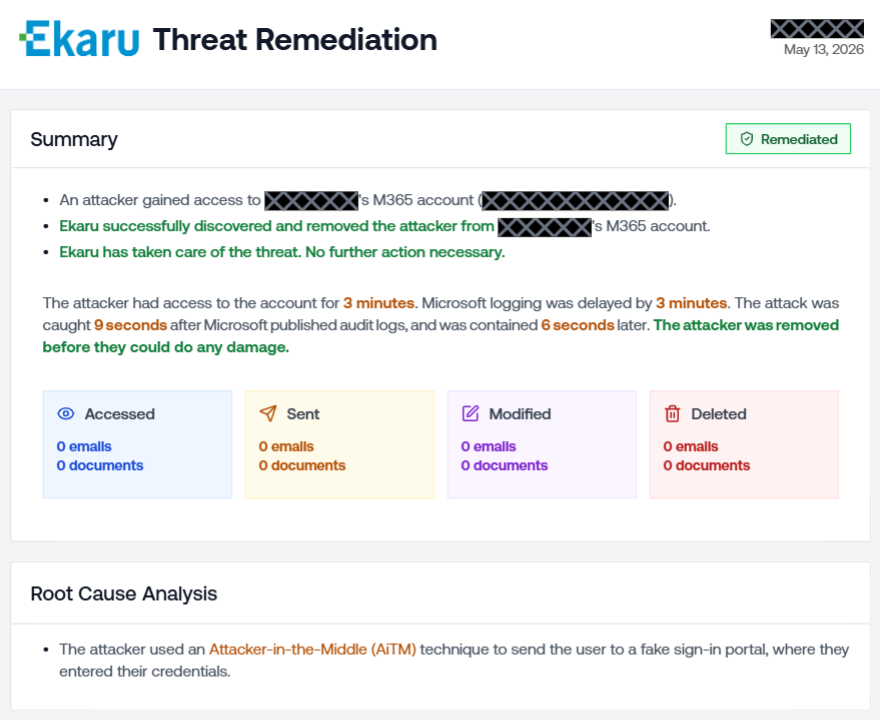
 We hear this all the time: 

“We already have email security in place - we’re good.”
“We’re on Microsoft 365 (or Google Workspace) - they take care of that.”

And it’s easy to see why at first that feels like enough. 

 Platforms like Microsoft and Google provide a powerful foundation - offering the infrastructure, built-in protections, and security features that businesses rely on every day. 

But here’s the part that often gets misunderstood:

They provide powerful tools - but they don’t replace a complete security strategy.

And even with strong protections in place…

No system catches everything.

What happens if something does get through?

Read More

Tags: eMail, cybersecurity, Microsoft 365


Ekaru Awarded GTIA Cybersecurity Trustmark for Excellence in Cybersecurity Practices

Posted by Ann Westerheim on 4/22/26 10:43 AM

Ekaru earned the GTIA Cybersecurity Trustmark, recognizing its commitment to secure, compliant IT practices and trusted client protection. 

Ekaru, a leading provider of IT support, cybersecurity protection, cloud services, proudly announces its achievement of the Cybersecurity Trustmark issued by the Global Technology Industry Association (GTIA). The Trustmark confirms that Ekaru has undergone a rigorous review of its cybersecurity policies, procedures, and controls.

“Achieving the GTIA Cybersecurity Trustmark reinforces our promise to our clients: security isn’t a feature - it is our foundation,” said Dan Wensley, CEO of GTIA. “This recognition assures our partners and clients that their data is in trusted hands.”

The GTIA Cybersecurity Trustmark follows a detailed evaluation aligned with frameworks such as NIST and CISA. In addition, CREST-accredited third-party assessors ensure audit integrity to the Trustmark standard.

Read More

Tags: Compliance, cybersecurity


Subscribe by Email


    Browse by Tag

    See all tags...


    Posts by Month

    See all months...


    Connect With Us


    Older Blog Posts

    For older Ekaru blog posts, go to ekaru.blogspot.com.