
 Protecting your business email doesn't have to mean giving up your privacy. Here's what modern email security actually looks at—and why even small businesses need to pay attention.
Recently, we were talking with a client about adding another layer of protection to their business email. It's something we've been recommending to help detect when someone who shouldn't have access gets into an email account.
As part of the conversation, we explained that the technology uses machine learning, a form of artificial intelligence (AI), to help recognize suspicious activity.
And that's where we think we may have lost them.
The client decided not to move forward. It didn't seem to be about the relatively small additional cost. We got the impression that the mention of AI raised a different concern: Wait, is artificial intelligence going to be reading all our emails?
They didn't actually ask that question, but the conversation got us thinking.
With AI showing up everywhere these days, it's understandable that business owners might feel uncomfortable with the idea of another technology examining their email.
After all, email isn't just a communication tool. It's where you exchange financial information, discuss employee matters, communicate with customers, and handle all sorts of confidential business details.
Nobody wants to feel like someone - or something - is looking over their shoulder.
And we agree. Privacy matters.
But so does protecting your business from cybercriminals who would love to get into those same email accounts.
The good news is that you don't have to choose between the two.
Why Would a Criminal Want to Get Into My Email?
When we talk with small business owners about cybersecurity, we sometimes hear a familiar reaction: "We're just a small business. Why would anyone target us?"
It's a reasonable question, and we hear it a lot!
If you're running a local accounting firm, construction company, non-profit, medical practice, or other small business, you're probably not imagining yourself as a target for sophisticated cybercriminals.
But think about everything that happens through your business email.
You send invoices. You receive payments. You communicate with customers. You approve purchases. You exchange confidential documents. You handle payroll and banking questions.
To a criminal, that's a lot of opportunity.
And one of the most concerning threats isn't necessarily a virus or a suspicious attachment. It's someone quietly getting access to a legitimate email account.
This is often part of a crime called Business Email Compromise (BEC).
Imagine a criminal gets into the email account of someone who handles billing. They might spend time watching conversations until they see an invoice about to be paid.
Then they send a message that appears to come from the business, asking the customer to send payment to a different bank account.
The customer recognizes the email address. The request fits into an existing conversation. Everything looks legitimate.
Until someone realizes the money went to the wrong place.
This isn't just a hypothetical concern. According to the FBI's 2025 Internet Crime Report, business email compromise accounted for approximately $3 billion in reported losses, making it one of the most financially damaging types of internet crime.
And small businesses aren't immune.
That's why we're so focused on helping our clients protect their email accounts.
But Doesn't Microsoft 365 Already Protect My Email?
Microsoft 365 (and Google Workspace) have important security features built in. They're good platforms, and we encourage businesses to use the protections available to them.
Multifactor authentication, strong account settings, and employee awareness all make a difference.
But here's the challenge.
What happens if someone gets into an account anyway?
Maybe an employee accidentally approves a fraudulent sign-in request. Maybe a password was stolen. Or maybe a criminal finds another way to gain access.
Once someone is signed in with legitimate credentials, their activity can be harder to recognize as suspicious.
That's where an additional layer of security can help.
It's called Identity Threat Detection and Response, or ITDR.
That's a mouthful, but the idea is simple.
ITDR helps recognize unusual activity that could indicate someone has gained unauthorized access to an account. It can alert the IT team and help them respond quickly.
Think of it as an alarm system for your business email.
You don't just want strong locks on the doors. You also want to know if someone who shouldn't be there has managed to get inside.
So, Is AI Reading Everyone's Email?
Here's where we get back to the question that started this whole conversation.
The security technology we're recommending doesn't read the body of your emails. It doesn't open your attachments or read the contents of your business documents.
Instead, it examines something called metadata.
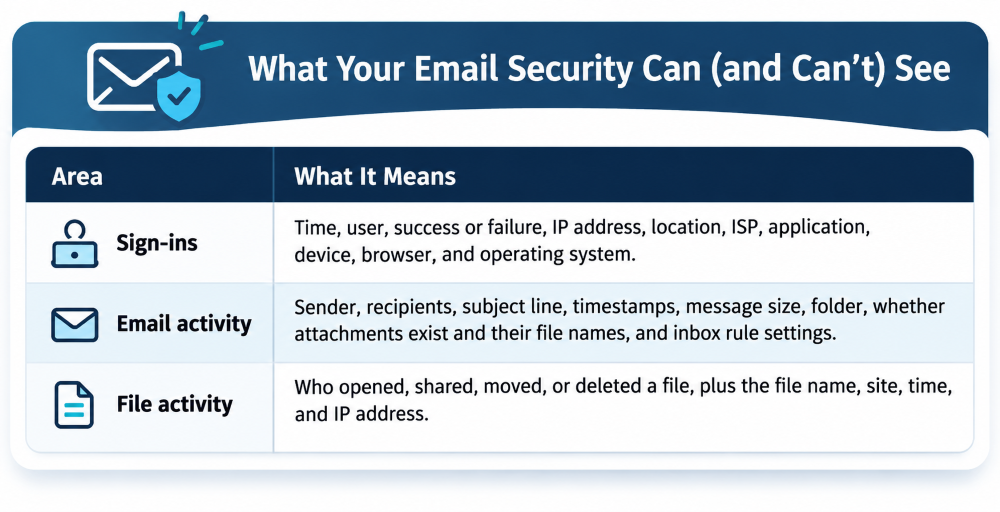
Metadata is simply information about something, rather than the actual content itself.
Think about an old-fashioned envelope.
Without opening the envelope, you can see who sent the letter, who it's going to, and when it was mailed.
You don't need to read the letter to know those things.
Email metadata works in a somewhat similar way.
For example, an email security system may look at:
- When someone signs in to an account
- Where they're signing in from
- Whether they're using a familiar device
- Who emails are being sent to and from
- Email subject lines and attachment names
- Whether someone has created an unusual email forwarding rule
That information can tell us a lot about whether an account is behaving normally, without reading the actual conversations.
It's worth pointing out that metadata isn't completely private or meaningless. An email subject line or file name might contain sensitive information, too. That's why it's important to understand what information a security provider collects and how it's handled.
But there's a big difference between looking for suspicious patterns in account activity and reading through everyone's business correspondence.
The goal isn't to monitor what your employees are saying. It's to recognize when someone who shouldn't be in your email account may have gotten in.
What Does Artificial Intelligence Have to Do With It?
The term AI can make this sound more intrusive than it really is.
When most people hear "artificial intelligence" today, they probably think about tools like ChatGPT that can read documents, answer questions, and generate content.
But AI is a much broader category of technology.
Machine learning, a form of AI, has been used for years to recognize patterns and identify unusual activity.
That's primarily how the security technology we're discussing works.
Let's say someone in your office normally signs in from Massachusetts using the same laptop every morning.
Then one day, there's a sign-in from an unfamiliar location or device. Shortly afterward, a new rule is created to forward email to an outside address.
Does that automatically mean the account has been hacked?
Not necessarily. People travel, replace computers, and work remotely.
But it's certainly something worth checking.
Machine learning helps recognize what normal activity looks like for an account and identify changes that could be warning signs.
In the security system we're recommending, the analysis primarily uses statistical patterns and account activity metadata. Where an AI model assists with a particular step, it uses metadata rather than the contents of email messages.
It's not a chatbot sitting there reading everyone's inbox.
And when something suspicious happens, the system can help the IT team investigate and take appropriate action.
That's a very different use of AI than many people might imagine.
What About Privacy and Access to My Information?
This is a question we think every business owner should feel comfortable asking.
When you connect a security service to Microsoft 365, you may notice that it requests permissions that sound pretty broad.
That can understandably raise concerns.
For example, a security tool may need the ability to remove a malicious email from an inbox if an attack is detected.
But the Microsoft permission that allows that action can also technically allow broader access to email.
That doesn't mean the security provider is using that permission to read your messages.
In the solution we're recommending, the provider uses those permissions to perform security actions, not to retrieve email bodies or read file contents.
The provider also states that it doesn't sell customer data and has zero-data-retention agreements with the AI model providers it uses.
Still, we think businesses should understand the difference between what a technology is technically permitted to access and what it actually does.
That's part of responsible cybersecurity.
You should be able to ask your IT provider what a security tool can see, why it needs access, and how your information is protected—and get a straightforward answer.
Small Businesses Can't Afford to Ignore Email Security
We know that small business owners have a lot on their plates.
You're focused on customers, employees, deadlines, cash flow, and all the other things that come with running a business.
Cybersecurity can feel like one more thing demanding your attention and your budget.
And with so many new technologies and security warnings, it's not always easy to know what's truly necessary.
That's why our philosophy at Ekaru is to focus on simple, smart, and affordable steps that make a meaningful difference.
You don't need to become a cybersecurity expert. You don't need to understand every technical term. And you don't necessarily need a complicated or expensive solution.
But you do need to take action.
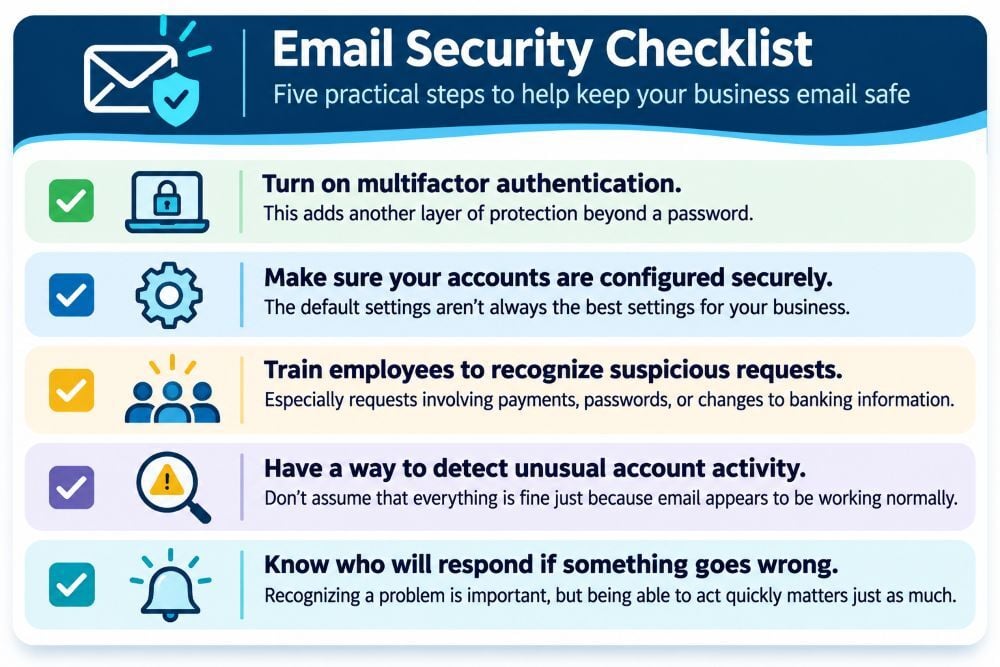
A few important steps include:
- Turn on multifactor authentication. This adds another layer of protection beyond a password.
- Make sure your accounts are configured securely. The default settings aren't always the best settings for your business.
- Train employees to recognize suspicious requests. Especially requests involving payments, passwords, or changes to banking information.
- Have a way to detect unusual account activity. Don't assume that everything is fine just because email appears to be working normally.
- Know who will respond if something goes wrong. Recognizing a problem is important, but being able to act quickly matters just as much.
Identity Threat Detection and Response is one more layer that can help, particularly when a criminal manages to get past the protections you already have in place.
We know small businesses have a lot going on, and cybersecurity probably isn't the first thing on your mind when you get to work in the morning. But the reality is that email is where so much of your business happens. And there are some pretty simple, affordable things you can do to protect it. We really want to see businesses take those steps before something goes wrong
When a Client Says No, We Still Worry
Here's something we don't always talk about when it comes to cybersecurity.
When we recommend a security improvement and a client decides not to move forward, we respect that decision. It's their business, and ultimately, it's their choice.
But that doesn't mean we stop worrying.
We're the people they've trusted to help keep their technology running and their business protected. And because of the work we do every day, we see the risks that many small business owners don't necessarily see.
We know how quickly an email account can be compromised, how convincing a fraudulent message can look, and how disruptive a security incident can be for a small business.
So when someone declines a security recommendation, the question that stays with us is: Do they really understand the risk they're choosing to accept?
Sometimes it's hard to tell.
And that's not a criticism of the client. Cybersecurity is complicated, and business owners have a hundred other things competing for their attention.
It's a reminder to us that we need to do a better job explaining not just what we're recommending, but why it matters, what it actually does, and what could happen without it.
We don't expect every client to say yes to every recommendation.
But we do want them to have enough information to make a decision they feel comfortable with - and to understand what they're potentially leaving unprotected.
Security Should Give You Peace of Mind
That recent client conversation reminded us of something important.
Sometimes what seems like a straightforward security recommendation to us can raise questions or concerns that we haven't fully addressed. And that's worth paying attention to!
We want small businesses to feel comfortable asking questions about AI, privacy, cybersecurity, and the technology they depend on every day.
We also want them to know that there are simple, smart, and affordable ways to improve their protection. You don't have to understand all the technical details, but you should understand why the protection matters.
At Ekaru, we work with local businesses that have enough on their plates already. Our job is to help make technology less stressful, not more, and we've been doing this for over 20 years!
If you're wondering whether your Microsoft 365 email is adequately protected, we'd be happy to have a conversation.
No pressure, no complicated technical lecture. Just a chance to talk about what you have in place, where you might be exposed, and what you can do about it.
Because the best time to understand a cybersecurity risk is before something goes wrong.
That's what we're here for at Ekaru.
About the author:

Ann Westerheim, PhD is the Founder and President of Ekaru, a Technology Service Provider of cybersecurity and IT services for small and medium businesses in the greater Boston area. Ann is an accomplished technology innovator and leader with three engineering degrees from MIT. She has twenty years of high tech experience in research, advanced development, product development, and as an entrepreneur. Her career has spanned a vast range of technology endeavors including research in thin film semiconductors and superconductors, microprocessor fabrication, development of early Internet medical applications, and now focusing on the application of technology in business. She has an avid focus on the "last mile" of technology and decreasing the digital divide.