
 It's been a whirlwind of a year in technology. Between rapid advances in artificial intelligence, data breaches, technology disruptions like November's Microsoft outage and FAA ground stop, and increasingly sophisticated online scams, it can be difficult to keep up with everything happening in the digital world.
And now the holidays are approaching!
We're shopping online, tracking packages, making charitable donations, traveling, and trying to get everything done before the end of the year. Unfortunately, cybercriminals know we're busy and distracted, and they're ready to take advantage of it. There's a lot of money in cyber crime, and the more distracted you are, the better it is for them.
While technology is changing at an incredible pace, many of the fundamentals of cybersecurity and fraud prevention remain the same. Understanding how scams work and recognizing the warning signs can go a long way toward protecting yourself, your family, and your business.
You don't need to be a technology expert to become more cyber aware.
Online Fraud Is a Growing Problem
According to the FBI's 2025 Internet Crime Report:
- More than one million internet crime complaints were reported.
- Reported financial losses reached $20.88 billion.
- Losses increased by 26% compared to the previous year.
And these are just the crimes that were reported. Also, the 2026 report won't be released until Spring of 2027, so we're sure to see these numbers climb.
One of the biggest misconceptions about online fraud is that it only happens to older adults or people who aren't comfortable with technology. The reality is that scammers target people of all ages, professions, income levels, and educational backgrounds. While older adults have typically accumulated more savings to lose (reported losses), the incidents span ALL age groups.
Cybercriminals are professionals at manipulating human emotions. They know how to exploit fear, trust, generosity, curiosity, loneliness, and our desire to be helpful.
Artificial intelligence is giving criminals additional tools to create convincing emails, realistic images, fake voices, and even fabricated videos. We're entering a world where seeing and hearing something isn't necessarily proof that it's real. Deep fake videos, and phishing emails AI-generated with perfect grammar and spelling.
Understanding the Fraud Formula
Last week, in recognition of International Fraud Awareness Week, we hosted a free fraud prevention workshop for our community at Ekaru.
I had recently participated in a Train-the-Trainer program with Operation Shamrock, an organization doing important work to educate the public and mobilize efforts to disrupt the scam industry.
One particularly helpful concept from their training is the Fraud Formula. Although scams come in many different forms, they often follow the same four-stage pattern:
- The Hook: An unexpected message, phone call, advertisement, or online interaction gets your attention.
- The Story: The scammer provides a convincing explanation for why they're contacting you.
- The Pressure: They use urgency, fear, excitement, or emotional manipulation to influence your decisions.
- The Payment: They attempt to get you to send money or facilitate a financial transaction.
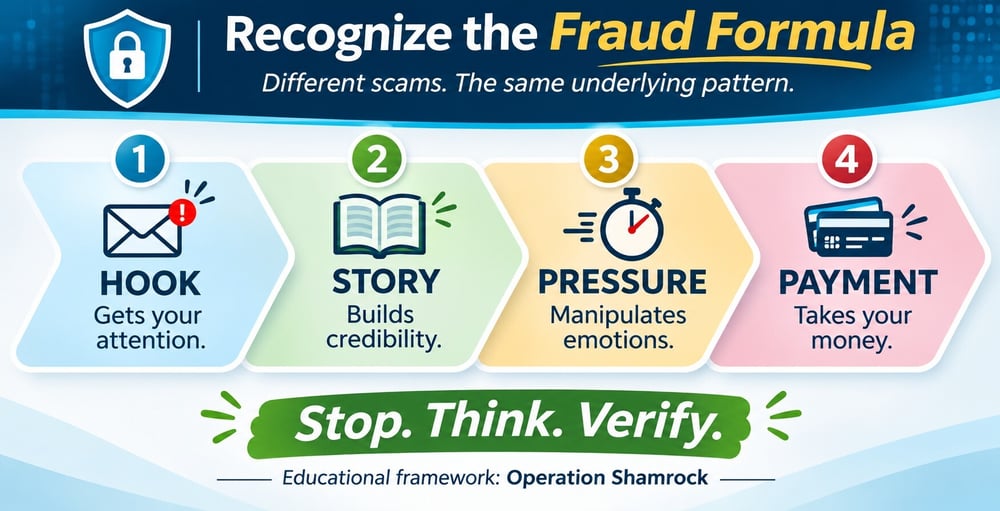
Think about how many suspicious messages you've received that follow this pattern.
A text message about an undelivered package. A phone call about suspicious activity on your bank account. An unexpected investment opportunity. An email from your boss asking you to purchase gift cards. Especially during the holiday season when everyone is busy, and there are a lot of packages on the way from online shopping.
The stories may be different, but the underlying strategy is often remarkably similar.
Once you understand the pattern, it becomes easier to recognize new scams, even ones you've never encountered before.
Seven Common Online Scams You Should Know About
1. Phishing Emails and Text Message Scams
Phishing involves criminals pretending to be a trusted person or organization to trick you into sharing information, opening an attachment, or visiting a fraudulent website.
During the holidays, watch out for fake shipping notifications, order confirmations, refund notices, and messages about problems with your online shopping accounts.
Phishing isn't limited to email. It can also happen through text messages (smishing), phone calls (vishing), and even fraudulent QR codes (quishing).
How to protect yourself: Instead of clicking a link in an unexpected message, go directly to the company's website or official app to check your account or order status.
2. Investment and Cryptocurrency Scams
Some investment scams begin with a seemingly innocent text message or a new online friendship.
Over time, criminals build trust before introducing an investment opportunity that promises exceptional financial returns. They may even provide access to a realistic-looking investment platform showing impressive profits that don't actually exist.
These relationship-based investment scams are sometimes referred to as "pig butchering" scams.
How to protect yourself: Be extremely cautious about unsolicited investment advice, guaranteed returns, and anyone who discourages you from discussing financial decisions with your family or a trusted financial advisor.
3. Fake Tech Support Scams
Have you ever seen a pop-up message warning that your computer has been infected with a virus and instructing you to call a phone number immediately?
Scammers use frightening security alerts, fake support websites, and misleading online advertisements to convince people to give them access to their computers.
How to protect yourself: Never call a number displayed in an unexpected security pop-up or allow an unsolicited caller to remotely access your computer. Contact your trusted IT provider or the software company directly.
4. Bank, Government, and Family Impersonation Scams
Scammers frequently impersonate trusted organizations, including banks, government agencies, and law enforcement.
They may claim your account has been compromised, you owe money, or you need to transfer your funds to a supposedly safe account.
AI-generated voice cloning can also make family emergency scams more convincing.
How to protect yourself: Hang up and independently contact the organization or family member using a phone number you already know and trust. Consider establishing a family safe word to help verify unexpected emergency requests.
5. Romance and Online Relationship Scams
Not every scam begins with a suspicious-looking email. Some begin with months of friendly conversations and relationship building.
Criminals may create fake identities, establish emotional connections, and eventually introduce a financial emergency or an investment opportunity.
How to protect yourself: Be cautious when online relationships escalate unusually quickly, particularly when someone repeatedly avoids meeting in person or starts asking for money.
6. Employment and Fake Job Offer Scams
An unexpected job offer promising flexible hours, remote work, and unusually high pay may be designed to steal your personal information or money.
Some scams involve fake checks, upfront equipment costs, or requests for sensitive information before a legitimate hiring process has taken place.
How to protect yourself: Verify job opportunities directly through the company's official website. Be suspicious of employers who ask you to send money before you start working.
7. Online Extortion Scams
Criminals may claim to have compromising information, photographs, or videos and threaten to release them unless you pay.
Sometimes they include an old password obtained through a data breach to make their threats appear credible.
These scams can also target teenagers and young adults, making conversations about online safety especially important for families.
How to protect yourself: Don't respond to threats by sending money. Preserve evidence, report the incident, and reach out to someone you trust for help. If a password has been exposed, change it immediately wherever it has been used.
Holiday Cybersecurity: Five Scams to Watch Out For
The holiday season creates additional opportunities for fraud because so many of us are expecting deliveries, looking for bargains, donating to charities, and making more financial transactions than usual.
In fact, the Federal Trade Commission issued a holiday shopping scam alert on November 19, 2026, reminding consumers that even sponsored search results can lead to fraudulent websites.
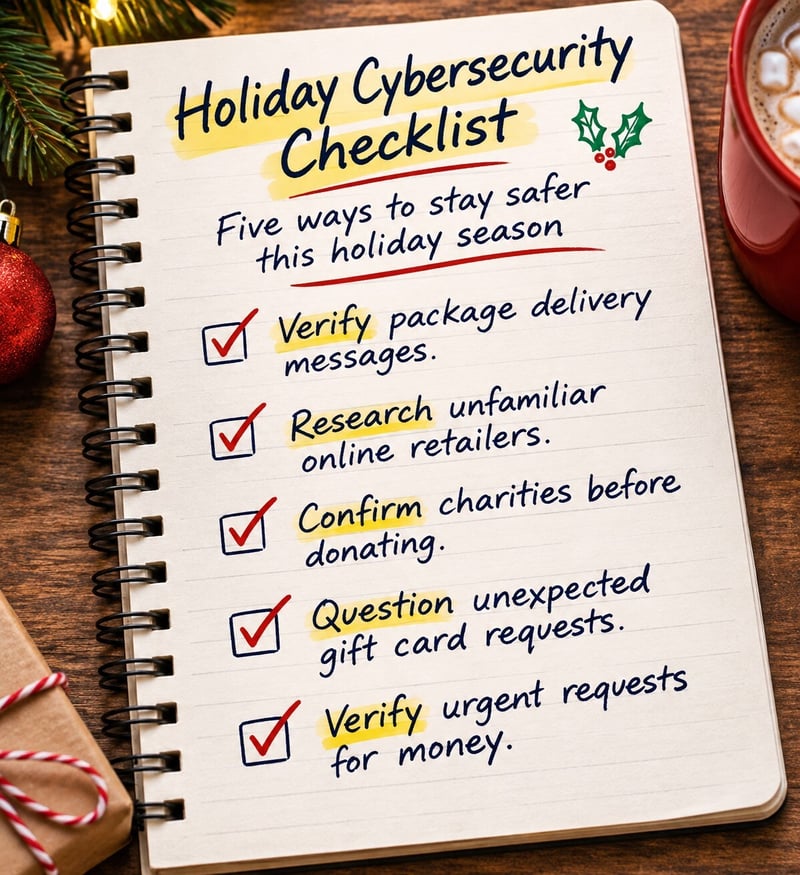
Pay particular attention to:
- Fake package delivery notifications: Check tracking information directly with the shipping company.
- Black Friday and Cyber Monday shopping scams: Research unfamiliar retailers and be skeptical of unbelievably low prices.
- Fake charitable organizations: Verify charities independently before making donations.
- Gift card scams: Never purchase gift cards to satisfy an unexpected payment request from a government agency, employer, or supposed tech support representative.
- Holiday travel scams: Independently verify rental properties, booking websites, and unexpected reservation messages.
Whenever possible, use a credit card for online purchases so you have additional options for disputing fraudulent transactions.
The holidays are a time for generosity and celebration. Taking an extra minute to verify something can help keep it that way.
Fraud Prevention for Small Businesses
Small businesses need to be particularly vigilant during the holiday season. Employees are taking vacations, businesses are processing year-end payments, and everyone is juggling competing priorities.
One particularly costly form of fraud is Business Email Compromise (BEC), where criminals impersonate business owners, executives, employees, or vendors to redirect legitimate payments.
Imagine receiving an email from a longtime vendor explaining that they've changed their banking information. The email looks legitimate, and the invoice is one you're expecting to pay.
Would your business have a process in place to independently verify the change?
Here are six practical steps every small business should take:
- Require independent verification of changes to vendor banking information.
- Confirm unusual payment requests by calling a known phone number.
- Require a second approval for significant financial transactions.
- Enable multifactor authentication (MFA), especially for Microsoft 365 and financial accounts.
- Provide regular cybersecurity awareness training for all employees.
- Create a workplace culture where employees feel comfortable questioning suspicious requests and reporting mistakes quickly.
Make it company policy that urgency never overrides verification.
Technology is an important part of cybersecurity, but business processes and employee education are equally important. We strongly recommend that small businesses invest in additional email security and proactive monitoring of their Microsoft 365 environments.
This isn't just a theoretical risk. In the past month alone, we've conducted cybersecurity scans for three local businesses, and in all three cases, we uncovered security threats within their Microsoft 365 environments that the businesses were unaware of.
One of the biggest challenges with cybersecurity is that everything can appear to be working normally while security threats go undetected. Just because your email is working and your employees are going about their daily business doesn't mean your environment is secure.
With so much of our business communication, financial transactions, and sensitive information flowing through email, it's more important than ever to have multiple layers of protection in place.
Don't wait for a cybersecurity incident to discover gaps in your protection. Proactively identifying risks can help prevent a costly and disruptive incident down the road.
Four Simple Habits That Can Help Prevent Fraud
With so much information about cybersecurity, it can be easy to feel overwhelmed. Start by developing these four habits, inspired by the Operation Shamrock training.
1. Trust your instincts. If something feels unusual, investigate before taking action.
2. Be cautious with unexpected communications. Let unfamiliar callers leave a voicemail, and independently verify unexpected messages instead of clicking their links.
3. Be careful with rapidly developing online relationships. Never feel obligated to send money to someone simply because you've developed an emotional connection online.
4. Stop and think before sending money. Be especially cautious about requests involving gift cards, cryptocurrency, Bitcoin ATMs, or unfamiliar payment arrangements.
You don't have to respond immediately. You don't have to click the link. You don't have to stay on the phone.
Give yourself permission to stop and verify.
What Should You Do If You've Been Scammed?
If you think you've fallen victim to online fraud, acting quickly is important.
- Stop communicating with the suspected scammer.
- Immediately contact your bank or credit card company to report suspicious transactions and secure your accounts.
- Contact your IT provider if someone may have gained access to your computer or business systems.
- Change compromised passwords using a trusted device.
- Consider freezing your credit with all three major credit bureaus: Equifax, Experian, and TransUnion. Actually, many security professional actually recommend proactively freezing your credit.
- Save relevant emails, text messages, receipts, and transaction records.
- Report the incident to your local police and the appropriate fraud reporting organizations.
Helpful resources:
- FBI Internet Crime Complaint Center: IC3.gov
- Federal Trade Commission: ReportFraud.ftc.gov
- Operation Shamrock: OperationShamrock.org
- Identity theft recovery assistance: IdentityTheft.gov
Be cautious of anyone who contacts you afterward claiming they can recover your stolen money for an upfront fee. These can be additional scams targeting people who have already experienced fraud.
And remember, anyone can become a target of a sophisticated scam. Talking about what happened and sharing information can help prevent others from experiencing the same thing.
Watch Our Free Fraud Prevention Workshop
If you'd like to learn more about recognizing online scams and protecting yourself, we've made our recent Ekaru fraud prevention workshop available to everyone:
Please feel free to share the recording with your employees, coworkers, family members, neighbors, and friends.
Consider making it part of your next staff meeting or sharing it with someone who could benefit from learning more about online safety. All of our online workshops are free and open to everyone.
Cybersecurity Is a Community Effort
At Ekaru, community education has always been an important part of what we do. Our technology workshops are open to everyone because we believe sharing knowledge is one of the best ways to protect our businesses, families, and neighbors.
I'm especially grateful to Operation Shamrock for their ongoing commitment to fraud prevention and for helping people like me bring this important information back to our own communities.
We can't control the pace of technology change, and we can't eliminate every cybersecurity risk. But we can learn the fundamentals, develop safer habits, and help the people around us do the same.
As we head into the holiday season, consider giving someone the gift of cybersecurity awareness. Share an article, start a conversation, or help a family member learn how to recognize a scam.
Fraud prevention starts with education, and education is something we can all share.
The more people we educate, the stronger our community becomes.
Have a happy, healthy, and cyber-safe holiday season!
About the author:

Ann Westerheim, PhD is the Founder and President of Ekaru, a Technology Service Provider of cybersecurity and IT services for small and medium businesses in the greater Boston area. Ann is an accomplished technology innovator and leader with three engineering degrees from MIT. She has twenty years of high tech experience in research, advanced development, product development, and as an entrepreneur. Her career has spanned a vast range of technology endeavors including research in thin film semiconductors and superconductors, microprocessor fabrication, development of early Internet medical applications, and now focusing on the application of technology in business. She has an avid focus on the "last mile" of technology and decreasing the digital divide.