.png)
We hear this all the time:
“We already have email security in place - we’re good.”
“We’re on Microsoft 365 (or Google Workspace) - they take care of that.”
And it’s easy to see why at first that feels like enough.
Platforms like Microsoft and Google provide a powerful foundation - offering the infrastructure, built-in protections, and security features that businesses rely on every day.
But here’s the part that often gets misunderstood:
They provide powerful tools - but they don’t replace a complete security strategy.
And even with strong protections in place…
No system catches everything.
What happens if something does get through?
You’re Doing the Right Things - But That’s Only One Layer
 When we talk about protecting your business, it’s not just one thing - it’s a combination of layers working together.
For most organizations, that includes:
- Strong passwords
- Multi-factor authentication (MFA)
- Email filtering and impersonation protection
- And just as important… reliable backups
That last one is where we often see some confusion.
If you’re using platforms like Microsoft 365 or Google Workspace, it’s easy to assume your data is automatically backed up.
But that’s not quite how it works.
Those platforms are designed to keep services running and data available - but they’re not a substitute for a true backup strategy that protects you from:
- Accidental deletion
- Overwritten files
- Ransomware or malicious activity
- Or even compromised accounts
In other words:
Just because your data is in the cloud doesn’t mean it’s fully protected from loss.
That’s your front line. It’s designed to:
- Keep bad emails out
- Stop users from clicking dangerous links
- Prevent unauthorized access
- Keep a copy of your emails in a backup
And it works most of the time.
But attackers have evolved. They’re no longer relying on obvious malware or sloppy phishing emails.
Dear Customer,
We detect unusual activity on your account. You must verify immediately or your account will be suspended.
Click here now to avoid losing access.
Pretty easy to spot, but that's not always the case anymore.
The Attacks Don’t Always Look Suspicious Anymore
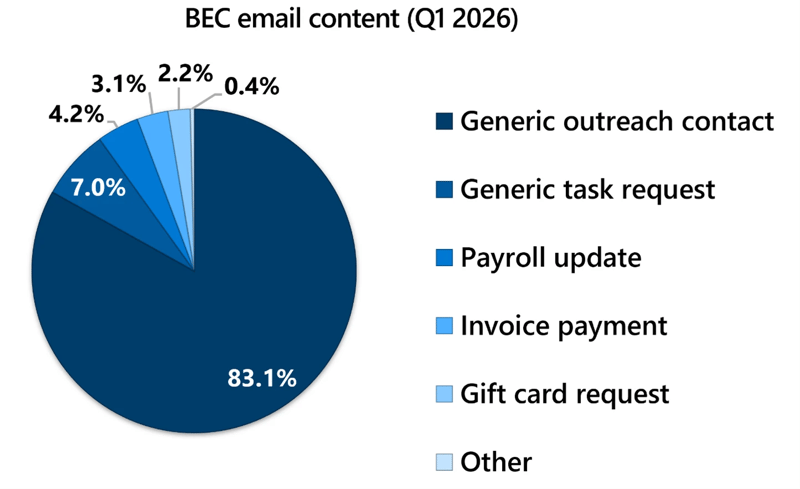 During the first quarter of 2026 (January to March), Microsoft Threat Intelligence detected approximately 8.3 billion email-based phishing threats.
We recently saw an example in the community that’s worth sharing: An employee received what looked like a legitimate RFP (Request for Proposal) - something that could easily be a real business opportunity. Nothing unusual about that. Inside the email was a QR code, which actually made it feel more legitimate.
They scanned it.
It led to a convincing login page. They thought the sender was being MORE SECURE by adding a login page.
And just like that, credentials were exposed.
This wasn’t someone being careless. This was a smart, experienced professional handling a normal part of their day - just like your team does with dozens (or hundreds) of emails.
That’s the reality now: Attackers are blending into everyday business workflows.
The Bigger Shift: It’s Not Just About Getting In
For years, cybersecurity has focused on prevention:
- Block the bad email
- Stop the malicious link
- Keep the attacker out
But today’s question is different:
What if they don’t need to break in… because they can just log in?
According to recent findings from Microsoft threat reports, attackers are increasingly targeting identities - not just devices or networks. If they can access a Microsoft 365 account, they don’t need malware.
They are the user.
This Is Where Most Security Strategies Stop
Let’s use a business office security analogy.
Most companies have:
- Locked doors
- Keycard or code access
- Cameras at entry points
That’s your email security and login protection.
But imagine someone steals a valid keycard and entry code and walks right in the front door.
A motion detector would alert that there was movement in the office, which could tip off security, but would your systems notice what they did when they were inside the office? Like accessing sensitive files, taking items when they left?
Bringing this back to email, would you know if someone:
- Accessed sensitive emails?
- Set up forwarding rules to hide activity?
- Sent messages posing as your team?
That’s the gap.
A Missing Layer: Watching What Happens After Login
There’s a growing focus in cybersecurity on something called Identity Threat Detection and Response (ITDR).
You don’t need to remember the acronym. The idea is simple:
It’s about detecting and responding to suspicious activity inside your accounts - not just trying to keep threats out.
This layer looks for things like:
- Logins from unusual locations or infrastructure
- Strange behavior inside an account
- Inbox rules designed to hide activity
- Signs that someone else is using a valid session
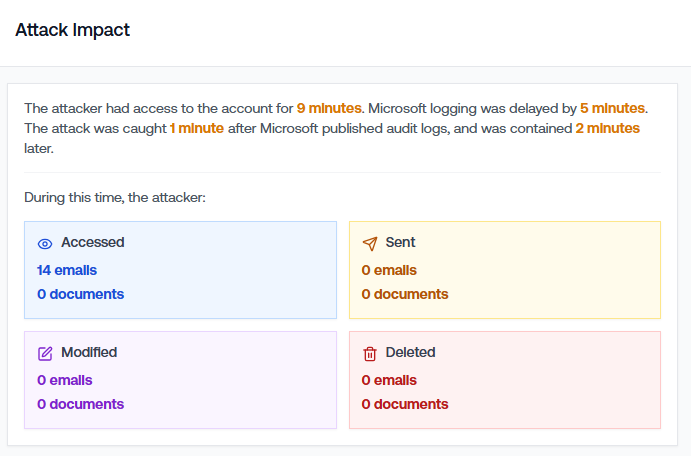
Because once an attacker is in, the risk isn’t theoretical anymore - it’s active. Here is an anonymized real example of an attack stopped in ONE MINUTE, with full visibility to what the attacker did. Each accessed email can be individually reviewed, and there's peace of mind knowing in this case that nothing was modified, sent, or deleted.
Why This Matters (Even If You’re “Doing Everything Right”)
This is the part that can feel frustrating.
You can have:
- Strong passwords
- MFA enabled
- Solid email filtering
…and still have risk.
Not because you did anything wrong - but because the threat has changed.
Attackers are patient. They test, adapt, and look for the one moment something slips through.
And when it does, the question becomes:
How quickly would you know?
A More Realistic Approach to Security
Good security today isn’t about one perfect tool.
It’s about layers that work together:
- Email security → stops most threats before they reach users
- MFA and access controls → reduce the chance of unauthorized login
- Monitoring and response inside accounts → catches what slips through
That last piece is the one many businesses don’t realize they’re missing.
Want to See What This Looks Like in Real Life?
We’re hosting a short, practical workshop later this month where we’ll walk through:
- How modern phishing attacks are actually working
- Real examples of account compromise (including what happens after login)
- What to look for - and what most businesses don’t see
- How to think about security in layers, without overcomplicating things
No jargon. No pressure. Just a clearer picture of what’s really going on—and what you can do about it.
👉 You can find the details here, and note our workshop will be recorded, so you can watch it later.
“What If They’re Already In? The New Reality of Email Security”
Let's keep the conversation going...
If your security strategy is focused only on keeping threats out, you’re covering an important piece of the puzzle.
But today, it’s just as important to ask:
If someone got in… would we know?
If you’d like a friendly second opinion on how your business is handling cybersecurity, or day-to-day IT support, we’re always happy to talk!
About the author:

Ann Westerheim, PhD is the Founder and President of Ekaru, a Technology Service Provider of cybersecurity and IT services for small and medium businesses in the greater Boston area. Ann is an accomplished technology innovator and leader with three engineering degrees from MIT. She has twenty years of high tech experience in research, advanced development, product development, and as an entrepreneur. Her career has spanned a vast range of technology endeavors including research in thin film semiconductors and superconductors, microprocessor fabrication, development of early Internet medical applications, and now focusing on the application of technology in business. She has an avid focus on the "last mile" of technology and decreasing the digital divide.