.png)
 In February, Windows 11 Updates consisted of its monthly Patch Tuesday fixes, AI features to boost workflow productivity, connecting your mobile device to your desktop, updates in voice narration controls, and accumulative performance updates.
For March, another round of cumulative updates have arrived to help users improve their overall security posture, boost productivity workflow, and introduce new expressive widgets.
At Ekaru, we specialize in Microsoft knowledge and reinforcing security guidelines. Our goals are to provide businesses and individuals alike with up-to-date cybersecurity news, trends, Windows updates and more! The best advantage for a business is educational awareness and staying ahead of cybersecurity trends.
Non-Security Preview Release
Microsoft Windows updates are intended to keep your devices protected, sustained productivity with security fixes, and feedback from previous updates for most optimized user experience. For a lot of users, new update rollouts occur gradually and/or normally. However, you also have the option to omit updates that you believe may not be impactful to your overall workflow. Optional released available at 4th week of the month. These are implemented two weeks after your latest monthly security update and about two weeks before you'll see these features become part of the next mandatory cumulative update.
To access optional non-security preview releases, navigate to Settings > Windows Update > Advanced options > Optional updates, select from the available updates, and click Download and install.
Updates For Windows 11 Version 26H1 (KB5079466)
Though this security update contains improvements from Version 26H1 (HB5077239) released in February 24, 2026, can be seen as:
-
Windows Defender Application Control (WDAC): The resolved bugs Improves how WDAC interacts with COM objects. Due to previous WDAC handles, COM was blocked by endpoint security policies. These endpoint policies intended to protect, was higher than the allow listing policy for COM that usually could go through the controls. After the update, COM objects are going through with no further issues.
- Windows System Image Manager: Improved reliability of choosing trusted catalog files. Confirms beforehand if the files you selected are from a trusted source before proceeding.
March: Windows 11 Version 25H2 & 24H2 (KB5079473)
Mandatory Windows 11 Version (KB5079473) update officially rolled out on March 10th as patch of March 2026 Patch Tuesday, with several new features present. Like most Patch Tuesday updates, the March release also includes a variety of behind-the-scenes improvements.
Some of the New Features Included:
-
Taskbar Update: Network Bar & Speed
-
Camera Angle Controls: Control, pan, and tilt for supported fine tuning camera controls within the settings app.
-
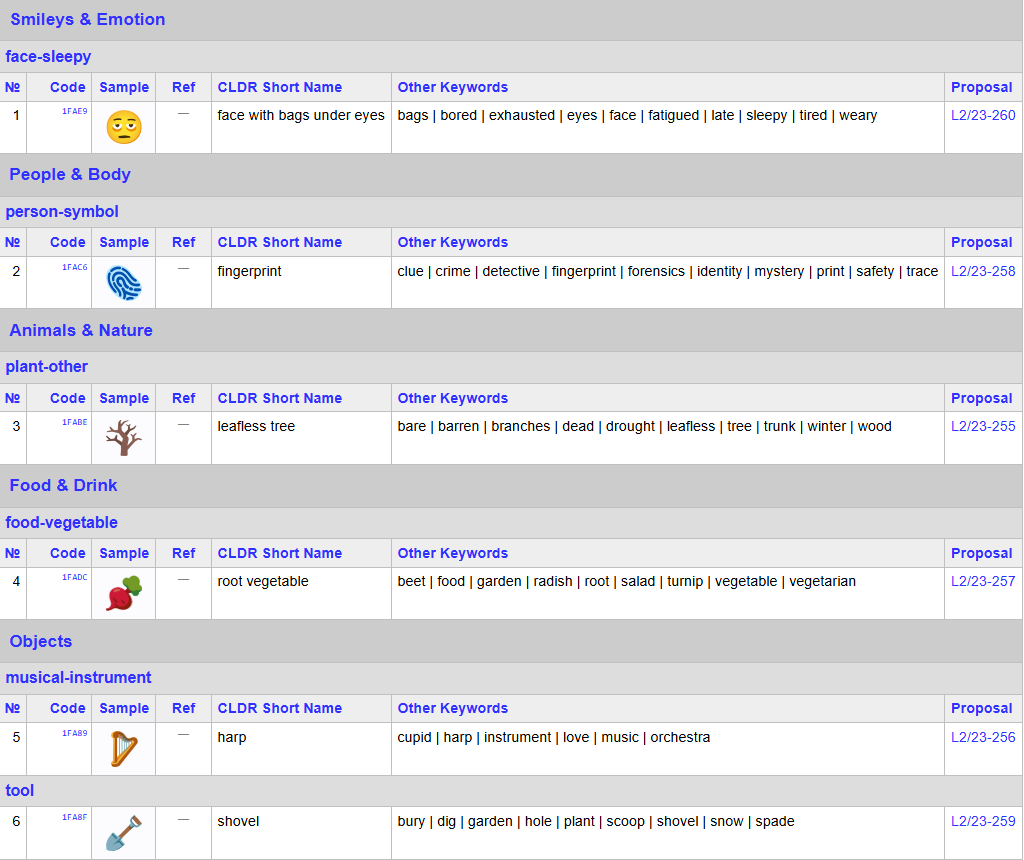
New Emojis Have Appeared: Emoji panel 16.0 release
-
Built-In System monitoring
- Machine Recovery Improvements
- Windows Backup Restore For organizations, and more!
Network Speed Test from the Taskbar
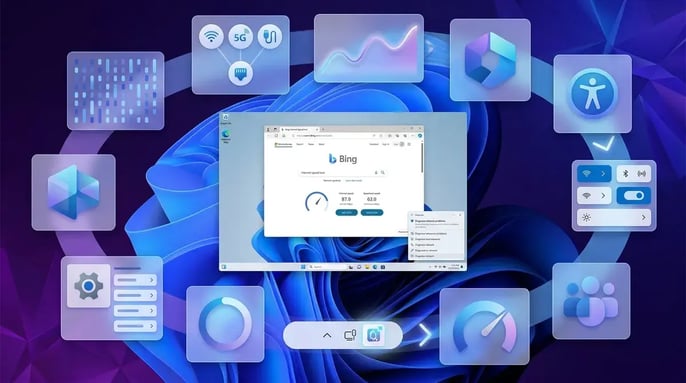
Windows 11 now includes a built-in internet speed test accessible directly from the taskbar. A quick way to test your internet connection without needing a third-party website.
Functions
- Right-click the network icon in the system tray
- Or open from Wi-Fi / Cellular Quick Settings
- The test opens in your default browser and measures:
- Download speed
- Upload speed
- Network performance
Camera Angle: Pan and Tilt Controls
Windows 11 now allows users to control pan and tilt settings for supported cameras directly from system settings. Built-in camera controls designed for webcams or conferencing cameras that support remote movement.
Location: Settings → Bluetooth & Devices → Cameras
Functions
- Adjust pan (left/right movement)
- Adjust tilt (up/down movement)
- Configure camera positioning without using third-party software
New Emoji 16.0 Support
Windows 11 now supports the Emoji 16.0 standard, bringing a variety of new emojis to the system. Emoji 16.0 adds new characters and improves compatibility with modern messaging and social platforms.
These new emoji characters are available within the Windows emoji panel, along with compatibility of emojis on and sent from mobile devices. Enhancing social media, messaging, and other collaboration apps.
Built-in Sysmon System Monitoring
Windows now includes Sysmon (System Monitor) as an optional built-in feature. Sysmon is an advanced system monitoring tool used to log detailed activity on a Windows system.
Tracking:
- Process creation
- Network connections
- File changes
- Security-related system activity
Quick Machine Recovery Improvements
Microsoft is expanding its Quick Machine Recovery (QMR) functionality. The Quick Machine Recovery is a recovery feature designed to help Windows automatically fix issues that prevent the system from booting correctly.
Improvements
- Enabled automatically for many Windows Pro devices
- Better recovery from critical startup errors
- Helps restore system functionality without manual troubleshooting
Windows Backup Restore for Organizations
Microsoft is expanding the Windows Backup restore experience for enterprise users. This means when a user signs into a new device, Windows can automatically restore:
- Settings
- Installed Microsoft Store apps
- Organizational configurations
Install Now or Wait?
In general practice, we recommend devices be updated as soon as possible, whether you're a general user or an IT professional. Ekaru tests all updates before they are rolled out to our clients.
Ekaru Helps You Stay Ahead
The Ekaru team helps organizations prepare for upcoming Windows 11 changes by working closely with your team to ensure updates align with your business needs, minimize disruption, and support accessibility, security, and productivity goals.
Our services include:
- Phased rollout strategies to reduce downtime while explaining what these mean for you and your colleagues.
- Security patch management and compliance support to remain on top of all updates.
- User awareness training, to stay ahead of all things cybersecurity.
- Ongoing monitoring and optimization across devices for any unusual activity.
Bottom Line
The March 2026 Windows 11 update focuses on usability and system improvements rather than major UI changes. The most noticeable features include the taskbar internet speed test, new emoji support, camera pan/tilt controls, and built-in Sysmon monitoring.
If you're looking to increase your organization's cybersecurity needs like Windows Updates, contact our team today to start planning your Windows 11 update strategy and ensure your organization is ready for what’s next!