.png)
 Security updates aren’t the most exciting topic—but they are one of the most important parts of keeping your business protected.
Right now, we’re seeing something that surprises a lot of people: about 13% of the systems in our community need a reboot. That means critical security updates are downloaded… but not fully protecting those computers yet.
Why reboots matter more than most people realize
Each month, Microsoft releases security fixes (often called “Patch Tuesday”). Behind the scenes, we carefully test critical patches within 24 hours, then roll out additional updates over the following week. This testing and deployment process is a core part of a healthy security program.
Here’s the catch: many of those security patches don’t actually take effect until you reboot. And we're seeing too many computers in our community that haven't been rebooted in too long.
Even more important, some patches are sequential. If the first update doesn’t fully install because the system hasn’t rebooted, the next one may not install at all. That leaves small - but meaningful - gaps in protection.
“But I shut my computer down every night…”
This is where things get tricky.
What we’ve found is that many people think they’re rebooting, but they’re not:
-
Closing the laptop lid usually puts the system to sleep or into hibernation
-
Shutting down with Windows’ default settings often uses Fast Startup, which is not a full reboot. Fast Startup is great because your computer will be available faster when you need it the next time, but you won't actually be rebooted.
-
Turning the computer back on after a shutdown doesn’t always clear things out the way you’d expect.
From a security and performance standpoint, that means your system may be running for weeks (or longer) without a true restart, and computers just aren’t designed to do that.
How to do a real reboot (the one that actually helps)
A full reboot is good for security and for keeping your system running smoothly.
Here’s the simple way to do it on Windows 11:
1. Click the Windows icon in the lower-left corner
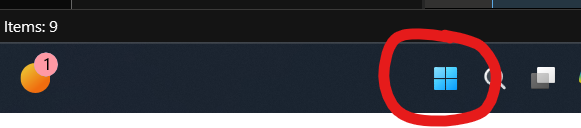
2. Select the Power option. "Right Click" to reveal the options (click with the Right, not Left, button on your mouse)

3. Click Restart (not Shut Down)
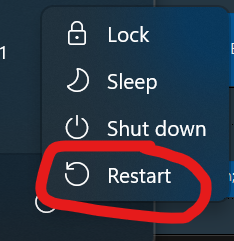
That’s it. This forces a true reboot, allowing security patches to finish installing and giving your system a clean start.
A small habit that makes a big difference
We schedule server reboots automatically during off-hours, but desktops and laptops are different - they’re often powered off overnight, which means we can’t safely force reboots during the workday.
That’s why we send reboot reminders from time to time. It may feel simple (almost too simple), but it’s one of the easiest ways to boost both security and performance.
So here’s a friendly challenge: grab a cup of coffee and reboot today ☕
It’s a small step that goes a long way - and if you ever want help setting better habits or understanding what your systems really need, we’re always happy to talk.
About the author:

Ann Westerheim, PhD is the Founder and President of Ekaru, a Technology Service Provider of cybersecurity and IT services for small and medium businesses in the greater Boston area. Ann is an accomplished technology innovator and leader with three engineering degrees from MIT. She has twenty years of high tech experience in research, advanced development, product development, and as an entrepreneur. Her career has spanned a vast range of technology endeavors including research in thin film semiconductors and superconductors, microprocessor fabrication, development of early Internet medical applications, and now focusing on the application of technology in business. She has an avid focus on the "last mile" of technology and decreasing the digital divide.