.png)
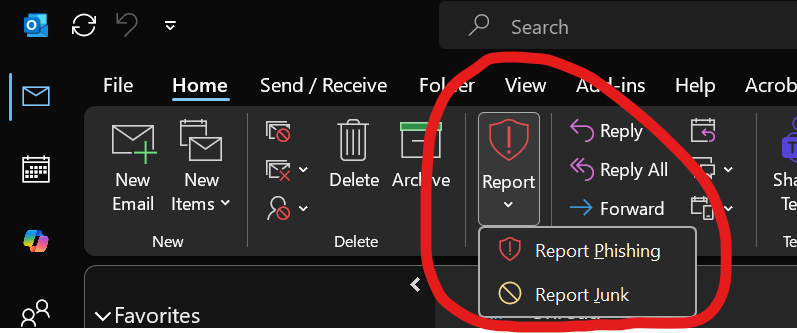 📩 Most employees have seen it.
That little button in Outlook:
👉 “Report Phishing”
👉 “Report Junk”
During a recent Cybersecurity Town Hall with one of our clients in Boston, someone in the room asked about this button - The question most people haven't asked:
What actually happens when someone clicks it?
And more importantly - is anyone paying attention?
This is worth exploring.
🧠 Your Employees Are Your Early Warning System
Even with great email security tools in place, no system is perfect.
Phishing emails still get through.
That’s just reality.
No security tool is 100% perfect - some phishing emails will inevitably get through. Cybercriminals carefully craft their messages to look legitimate, avoiding obvious red flags, suspicious links, or known spam triggers.
What makes the difference is how quickly your business can detect and respond.
And that’s where this simple button becomes powerful.
🛑 What Happens When a User Clicks “Report Phishing”
When someone reports a phishing email in Microsoft Outlook, a few important things happen behind the scenes:
📤 1. The email is sent to Microsoft
Microsoft analyzes the message using global threat intelligence:
- Suspicious links
- Impersonation attempts
- Malware indicators
This helps improve protection - not just for you, but across all Microsoft 365 users.
🗑️ 2. The email is removed from the user’s inbox
It’s typically moved to Junk or Deleted Items, reducing the chance of accidental clicks later.
👀 3. (Optional—but important) Your IT team can be notified
This is the part many small businesses are missing.
With the right configuration:
- A copy of the reported email can go to a monitored inbox (like security@yourcompany.com)
- Your IT provider can review it quickly
- If needed, they can take action across the organization (the email can be removed for other users)
👉 Without this step, the report may only go to Microsoft - and your team never sees it. When a user reports a phishing email, it’s a positive step. Those reports go to Microsoft and help improve detection across the broader ecosystem. If you want to take it a step further, you can also choose to have those reports sent to someone within your organization so they can review and respond more quickly. This could get "noisy" but could also help with Security Awareness Training.
📧 What About “Report Junk”?
“Report Junk” is different.
It tells Microsoft:
“This is unwanted email”
But it does not trigger the same level of urgency or investigation.
- No security response
- No alerting
- No organization-wide action
It helps improve filtering - but it’s not a threat response. For example, you may have signed up for promotional emails from your favorite store at some point in the past. Perhaps today you no longer wish to receive the weekly sales promotions from Kohls, or wherever. We recommend "unsubscribing" as a first course of action, but you could report them as "Junk" to clear them quickly from your inbox and reduce clutter. In this case, though, we do not recommend reporting as "Phishing", because its not really a phishing email. Even if you're annoyed, reserve the phishing flag for a legitimate security concern.
⚠️ Why This Matters for Small Businesses
Here’s what we see all the time:
- One employee reports a phishing email
- Another employee clicks the same email minutes later
- The business didn’t realize it was a broader issue
That gap - between detection and response - is where risk lives.
🛠️ A Simple (and Often Overlooked) Security Upgrade
The good news?
You don’t need expensive security tools to improve this.
Most Microsoft 365 environments already allow you to:
- Capture reported phishing emails
- Route them to a designated inbox
- Review and respond quickly
This turns your team into a real-time detection network. You can elect to configure to remove the email for everyone. This requires that everyone is on the same page, and you have trained users to reserve the "phishing" designation for actual phishing, so everyone doesn't lose access to, for example, a newsletter that is of value.
One quick reminder: avoid forwarding suspicious emails to coworkers to ask, “Is this phishing?” That well-intentioned step can spread the risk - someone may click it. Instead, use the “Report Phishing” button. We've seen this happen way too many times in our local community. In the ProofPoint State of the Phish Report, researchers found an intriguing statistic: 2.5% of people will click a suspicious link out of curiosity - even when they know they shouldn’t! So NEVER forward around suspected phishing emails!
💡 Cybersecurity for Main Street Takeaway
Cybersecurity isn’t just about software, and EVERYONE on the team has an active role to play.
It’s about visibility and response.
When your team clicks “Report Phishing,” that’s not just a button -
it’s a signal.
The question is:
Is anyone listening? Yes! Microsoft is receiving these reports, and you can also designate someone on your team to get the reports as well.
✅ What You Can Do Next
- Make sure your “Report Phishing” button is enabled in Outlook
- Configure reports to go to a monitored mailbox if you'd like that extra step
- Talk to your IT provider about how reports are reviewed and acted on
- Reinforce to your team: If something looks suspicious - report it
🔐 Final Thought
Even with the best tools in place, people are still your first line of defense.
But they can also be your fastest detection system -
if you give them a way to raise their hand and someone is ready to respond. Make it a habit to talk about cybersecurity on a regular basis with your team.
❓Got Questions about Cybersecurity?
If you have questions about your security setup - or want to make sure you’re getting the most out of tools you already have - reach out to Ekaru. We’re always happy to help. Contact Us
About the author:

Ann Westerheim, PhD is the Founder and President of Ekaru, a Technology Service Provider of cybersecurity and IT services for small and medium businesses in the greater Boston area. Ann is an accomplished technology innovator and leader with three engineering degrees from MIT. She has twenty years of high tech experience in research, advanced development, product development, and as an entrepreneur. Her career has spanned a vast range of technology endeavors including research in thin film semiconductors and superconductors, microprocessor fabrication, development of early Internet medical applications, and now focusing on the application of technology in business. She has an avid focus on the "last mile" of technology and decreasing the digital divide.