.png)
 Let’s set the stage: It’s a Tuesday, still the beginning of your workweek and you notice 3 separate phone calls from an unknown number within the last 2 hours. For us in MA, these phone numbers commonly begin with (855), (866), (844) and sometimes even (774) which is a common area code in central MA. It seems like these spoofing spam calls are trying to reach you more than your friends and family. It’s distracting to receive these during the workday, and sometimes frustrating when trying to figure out the overall cause. You begin to block these unknown numbers, leading to even more calls causing you to wonder if your information has been leaked online somewhere. For iPhone, MAC, and Android users the uptick in spam calls is a nuisance.
Updating Your Devices
At Ekaru, while we work alongside our clients and their laptops, adding security tools to your devices for your business’ safety, we also provide recommended up-to-date security practices that’ll help you streamline further business operations and stress-free outside of work.
While blocking spam callers and screening them won’t be the all-in solution to getting rid of this issue because scammers are actively changing their tactics, there are ways that will reduce the number of calls daily and leave you to decide who can reach you.
How to Manage Spam Calls on MAC:
- To reduce the amount of spam callers reaching you: go to your MAC’s settings, head to apps, select Phone or Facetime.
- From there, you have the option to block voice calls, Facetime calls, and messages from those you may know.
- To send unknown callers to voicemail: click calls, select unknown callers. This way you will get notifications from callers within your contacts, recent outgoing calls and even Siri Suggestions.
- For screening or silencing unknown callers: click calls, select whether to ask the reason for calling you, or silence the call altogether. All leaving you with the decision to make the choice of picking up the call or ignoring them if you don’t recognize the unsaved number.
It’s also important to consider: If you are travelling your calls will not be screened and if in the case of an emergency, call screening will be disabled for 24 hours.
Also an essential reminder to ensure you are updating your devices t the most recent IOS to avoid any holes in security.
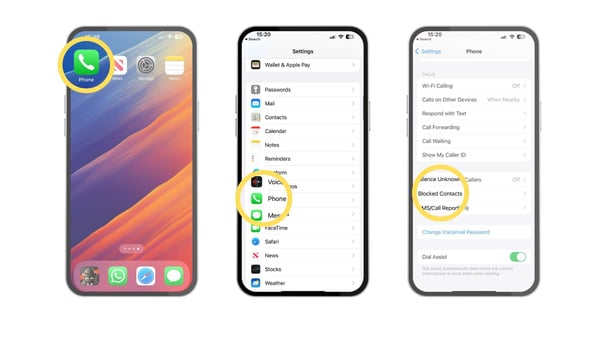
iPhone IOS 26
Have you updated your iPhone to the most recent IOS, IOS 26 is the 19th release of Apple’s IOS operating systems that was released on September 15th, 2025? Understandably, it’s confusing when IOS 26 was IOS 18 and the layout has changed, signaling you to constantly adapt to a new user design. While the design may be refreshing to some users, others may struggle with navigating this new landscape in regard to legibility, user interaction and overall visuals.
What stands out for IOS 26 is their security feature to screen spam callers that IOS 18 lacked in their updates. IOS 26 introduces powerful call screening to combat spam calls that allow you to choose between silencing unknown callers or stating their intentions in trying to reach you. While majority of us use iPhone for our day-to-day lives and MFA authentication to access our devices, managing spam and unwanted calls isn’t just a consumer inconvenience, it’s a real productivity and security concern for businesses.
Setting up Phone Screening In IOS 26:
- Head to your phone app, locate the three lines at the top right of your phone calls and choose manage filtering.
- When selecting manage filtering, it transfers you over to the Phone section in settings where you will find the screen unknown calls section. Just know the default is set to off.
- Your options are Never, Ask reason for calling and Silence.
- When using "Ask for a reason for calling", Siri intercepts the call as the one that asks and explains why they’re calling. You will get a notification on your lock screen, but your phone won’t automatically ring or stop in the middle of what you’re doing audio wise like how others that try calling you. I live by the theory that if it’s important, they will send a voicemail.
- There is also a call filtering section where you can turn on this feature to filter out known callers, along with filtering your missed calls on your phone. One side for those you know, a filter for all unknown or potential spam callers.
At the end of the day, you now have the choice to choose whether to answer or ignore, and go about your day without interruption.

How to Reduce Spam Callers on Android
Android devices also include several built-in tools that help users reduce interruptions, avoid scam attempts, and stay focused throughout the workday.
Steps To Reduce Spam Callers:
- Block recurring spam callers directly from their call history. Reporting Spam helps Android improve its global detection system, benefiting your entire organization by reducing how often those calls reach other users.
- Enabling Silence Unknown Callers. Calls from unknown sources won’t ring through but will still be logged, ensuring legitimate messages aren’t missed while cutting down on interruptions.
- Some Android models allow phones to automatically answer and detect suspicious calls using an automated assistant. This allows a live transcript of what the caller is saying, allowing them to decide whether to engage or disconnect. An ideal for frontline workers who receive large call volumes.
- Security updates and app updates often include improved spam-filtering capabilities. Ensuring company devices are patched regularly strengthens protection and keeps call-screening features running at peak performance.
Bottom Line
Protecting your team from spam callers isn’t just about convenience, it’s about safeguarding productivity, privacy, and your organization’s overall security posture.
With the right tools and practices in place across desktop phones, iPhone, and Android devices, your business can drastically cut down on interruptions and potential threats.
At Ekaru, our specialized team assists small-to-medium-sized businesses navigate these challenges by providing practical guidance, helping you to implement the latest call-filtering solutions, and ensuring your communication systems remain secure and efficient.
If your organization is ready to strengthen its defenses and streamline its technology, our team is here to help. Contact us today to explore how our services can support your business and keep unwanted callers out of your workflow.