.png)
One of the questions we hear a lot is: "Can I get the new version of Office if the rest of the people in my business use an older version? How will I be able to share files?"
Yes! Go ahead and get the latest version! The good news is that the newest version of Office can always open files created in older versions (backwards compatible). When you create a new file in Office 2007 or Office 2010, you have the option of saving it in an older version, or users of the older version can download a free Compatibility Pack from Microsoft for Excel, Word, and PowerPoint. Usually, the first time they try to open an Office 2007 or Office 2010 file, they'll be automatically prompted to download the Compatibility Pack.
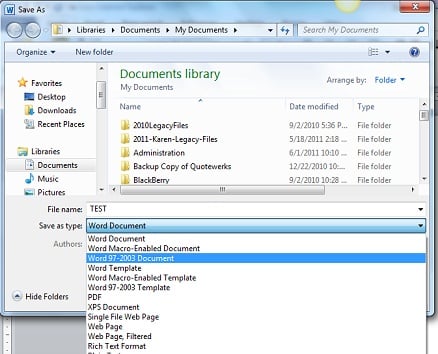 Here's how to save the file as an older version. Select "File" / "Save As" / and from the "Save as Type" pull-down, select "Word 97-2003 Document".
If you're sending a file to a client, and you know they have an older version of Office, this may be the more graceful way to handle things so they don't need to use the Compatibility Pack, but that's pretty easy too.
The new file format was introduced to reduce file size, improve security and reliability, and enhance integration with external sources. Keep in mind that when a file is saved as an older version, or opened in an older version of Office, some of the latest features won't available, but the users should in general have no trouble sharing files.